
September 26, 2026
Project Notes Pro 6.3.0: Smoother email and meeting follow-up
By Paul McKinney
I don't know how often you find yourself finishing a meeting and thinking, "Now I need to turn all of this into an email."
That is one of those small project management chores that does not look like much from the outside. But it adds up. You have the notes. You have the action items. You know who needs the update. Then you still have to copy the right people, build the message, attach the report, and schedule the next conversation.
Project Notes Pro 6.3.0 is focused on making that part feel smoother.
From plugin workflow to native workflow
Earlier versions of Project Notes Pro handled a lot of reporting and email work through plugins. That worked, and it gave the app room to grow. But over time, some of those plugin features became too central to feel like add-ons.
Sending meeting notes should not feel separate from writing meeting notes.
Sending a status report should not feel like jumping into another tool bolted onto the side of the app.
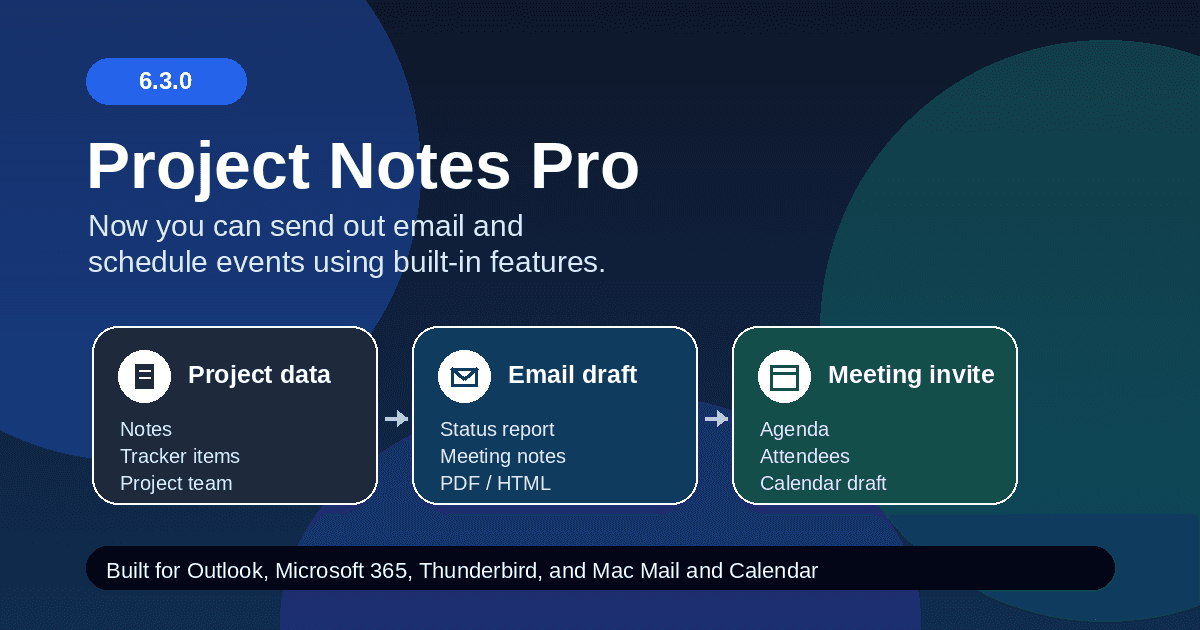
In 6.3.0, those communication workflows have moved into the native application. Reports, meeting notes, email drafts, meeting invitations, templates, and recipients now feel like parts of one flow.
That is the main story of this release. Less jumping around. Less setup in the moment. More of the follow-up work starts from the project itself.
Reports and meeting notes are easier to send
Project Notes Pro can now prepare email communication for several common project workflows:
- Send Notes for one saved meeting note
- Meeting Notes Report
- Status Report
- Tracker Items Report
You still review everything before it goes out. Project Notes Pro prepares the draft, fills in the report or meeting note content, and hands it to your email tool.
It does not silently send anything in the background. I like that. Project communication still needs a human check before it leaves your account.
The difference is that the first draft is no longer a blank email. The project information is already there, and the app helps carry it forward.
Audiences make repeat communication feel natural
One of the more practical additions is a new idea called audiences.
An audience is a saved distribution group for a project. You might have one audience for a client status report, another for an internal tracker review, and another for follow-up after a meeting.
That matters because real projects rarely have one mailing list that fits every situation. Some people need the weekly status report. Some only need open action items. Some should be included when meeting notes go out because they were in the room, or because they need the record afterward.
Now you can define those groups once and reuse them. The app remembers the audience, but you still decide when to use it.
That feels more like how project communication actually works.
Office 365 and Outlook workflows are smoother
A lot of the work in 6.3.0 went into making the handoff to Microsoft tools feel better.
If you work with Microsoft 365, Project Notes Pro can create drafts through the web. Your email drafts open in Outlook on the web, and meeting drafts can open from your Microsoft 365 calendar. That gives you a clean review step without forcing everything through a local desktop app.
On Windows, the app also supports both new Outlook and Outlook Classic. That is important because teams are not all moving at the same speed. Some people already live in new Outlook. Others still depend on Outlook Classic, especially for meeting invitations and older desktop workflows.
Project Notes Pro tries to meet you where you are instead of forcing one path.
Mac and Linux are part of the story too
This release is not just about Windows.
On macOS, Project Notes Pro works with Mac Mail and Calendar. Reports can open as Mail drafts, and meeting follow-up can move into Calendar. There are a few platform limits, especially around attachments and attendees, but the workflow is still much smoother than rebuilding the message by hand.
Linux support is available too. You can use Thunderbird, Microsoft 365 through the web, or the default system handoff where your desktop is configured for it.
That cross-platform support matters to me because Project Notes Pro has always been a desktop app that should fit the machine you actually use. A project manager should not have to change operating systems just to get a decent follow-up workflow.
Why this release matters
Project Notes Pro has always been about keeping the project record close to the work.
Version 6.3.0 takes the next step: it helps turn that project record into communication.
Not in a flashy way. In a useful way.
You finish the meeting. You send the notes. You prepare the report. You schedule the next conversation. The app already knows the project, the people, and the follow-up items, so it can help you move from recordkeeping into action with less friction.
That is the improvement I care about most in this release. Project follow-up feels less like a separate chore and more like a natural continuation of the work you were already doing.
You can explore Project Notes Pro on GitHub:
github.com/kestermckinney/ProjectNotes
You can also learn more at:
Written by Paul McKinney, founder of Project Notes Pro.